Ways to save money, one bill at a time
This money saving checklist gives you 55 ways to save money, grouped by part of the household budget. Tick the ones you will try and write in what each change saves you per month. The sheet adds up your ticked ideas for a monthly and a yearly total.
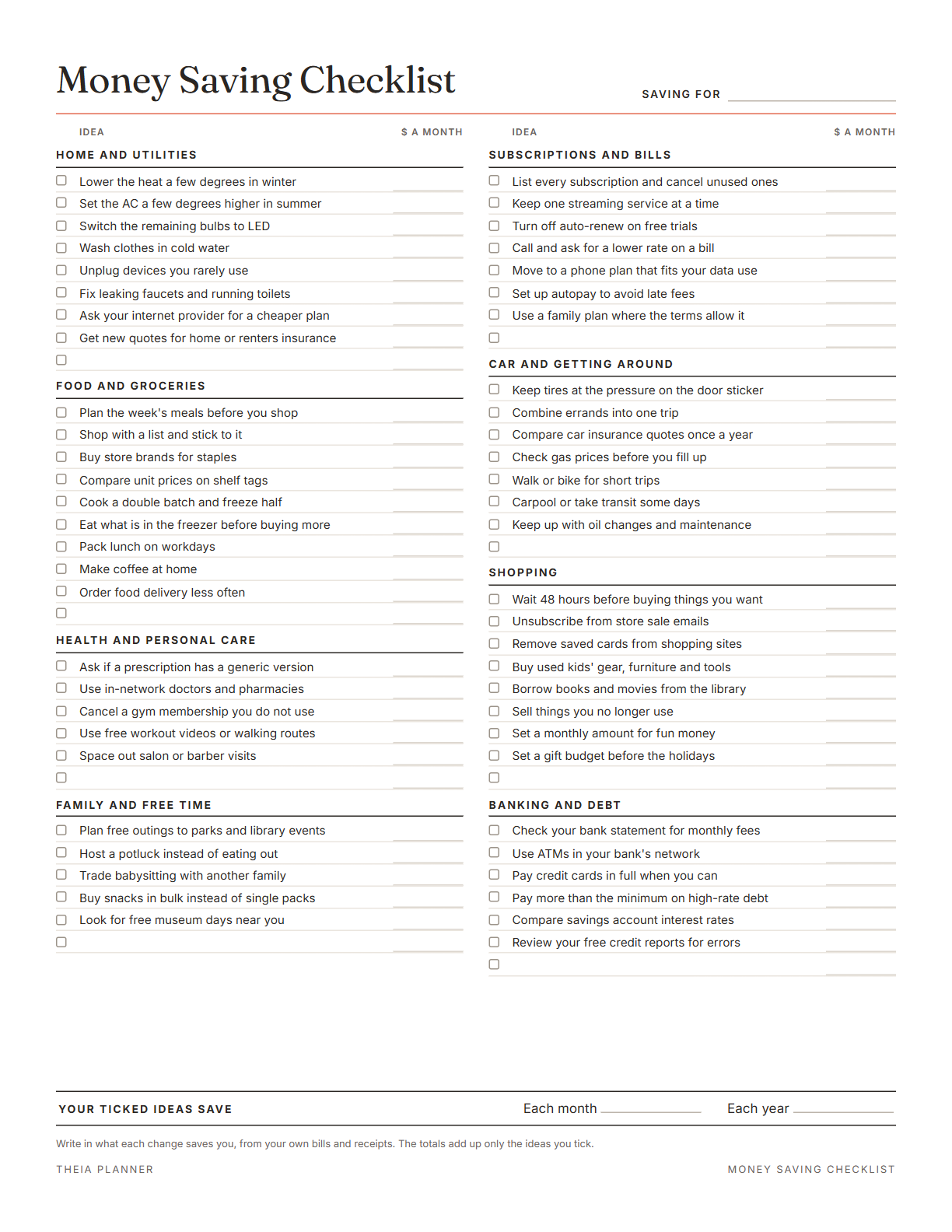
Free money saving checklist to fill in
Tick items on screen or print the list. Add your own items on the blank lines, then print it or save it as a PDF. It is free, with no sign-up.
Write in what each change saves you, from your own bills and receipts. The totals add up only the ideas you tick.
What is on the money saving checklist
How to reduce household expenses step by step
- Read through the groupsTick each idea you can try this month, and skip the ones that do not fit your home.
- Write in the savingsCheck your bills and receipts, then type what each change saves per month in its box.
- See the total and printThe sheet shows your monthly and yearly totals. Print it or save a PDF to keep next to your budget.
The free online version, in action
How to cut expenses in a sensible order
If you are working out how to cut expenses, a set order keeps the job manageable. The steps below start with a full list of your spending. They end with the costs that change every week, like food and transport.
Go through one or two months of bank and card statements. Write down every bill, subscription and regular purchase with its amount. Working from real numbers shows where the money actually goes.
Cancel subscriptions, memberships and services nobody in the house has used lately. These cuts are often quick, and they keep saving every month after. Turn off auto-renew on any free trials at the same time.
Internet, phone and insurance bills come back every month or year. Call providers to ask about cheaper plans, and compare insurance quotes before renewal. A lower rate on a fixed bill keeps working without any daily effort.
Grocery and travel costs change from week to week, so they depend on steady habits. Plan meals before you shop, pack lunches and combine errands into one trip.
Use your own bills to fill in the monthly amount for each ticked idea. The totals then come from your household's real numbers.
Some costs change through the year, such as heating in winter and cooling in summer. Look over the list again every few months and tick any ideas that now fit.
Reminders in your Google Calendar
Connect Google Calendar once, and these items are added to a separate “Theia Planner” calendar. Items with a time get a reminder 30 minutes before.
How calendar sync works- Each bill on its due day, with the amount
- Monthly bills that repeat on their own
- Yearly bills, such as insurance, in their month
- A savings goal date, if you set one
Who uses these money saving tips
Go through the home and utilities group first, where changes like washing in cold water are simple to try.
Tick ideas as a pair, and agree on who checks each bill or subscription.
The food and shopping groups suit a tight budget with only a few fixed bills.
Start with a handful of ideas, write in the real savings, and add more next month.
Money saving checklist on paper or online?
Each option works. The table below shows what each one does for you.
| Feature | Theia Planner | Free printable | Spreadsheet |
|---|---|---|---|
| Free to start | |||
| Set up for you in about a minute | |||
| Reminders on your phone | |||
| Dates and totals worked out for you | |||
| Works on phone and computer | |||
| Shared with family, with roles | |||
| A paper copy for the fridge |
Questions about ways to save money
What are some simple ways to save money?
Common ones include canceling unused subscriptions, planning meals before shopping and asking providers for cheaper plans. The checklist has 55 ideas like these, sorted into 8 groups.
Is the money saving checklist free?
Yes. Tick and type on screen, then print the page or grab the blank PDF. No account or email is needed.
How much will these ways to save money save me?
That depends on your own bills and habits, so the sheet does not estimate it. You write in each amount, and it adds up the ideas you tick.
Does the checklist show a yearly total?
Yes. On screen it multiplies the monthly total of your ticked ideas by 12 to show the yearly amount.
Can I add my own ideas?
Yes. Each of the 8 groups ends with a blank line, a tick box and an amount box.
Does this include investing advice?
No. The checklist covers everyday spending only. For advice on investing or debt, talk to a licensed financial adviser or a nonprofit credit counselor.
Does the online app have a money saving checklist?
No. The free Budget & bills template tracks spending against a monthly budget, bills and subscriptions with due days, a savings goal and debts. Use the printable for the list of ideas.
Is the sheet linked to my bank?
No. Your ticks and amounts never leave this browser, and the Clear button wipes them. The sheet never connects to a bank or card account.
More free planners and trackers

Track spending and bills free online
It is free to start, and the setup takes about a minute.
Start free