Monthly planner with goals and a habit strip
This free monthly planner puts the whole month on one page, with goals, notes and three habits to track. Pick a month of 2027 or 2028, or leave it undated. Type your plans on screen, then send the page to your printer or save a PDF.
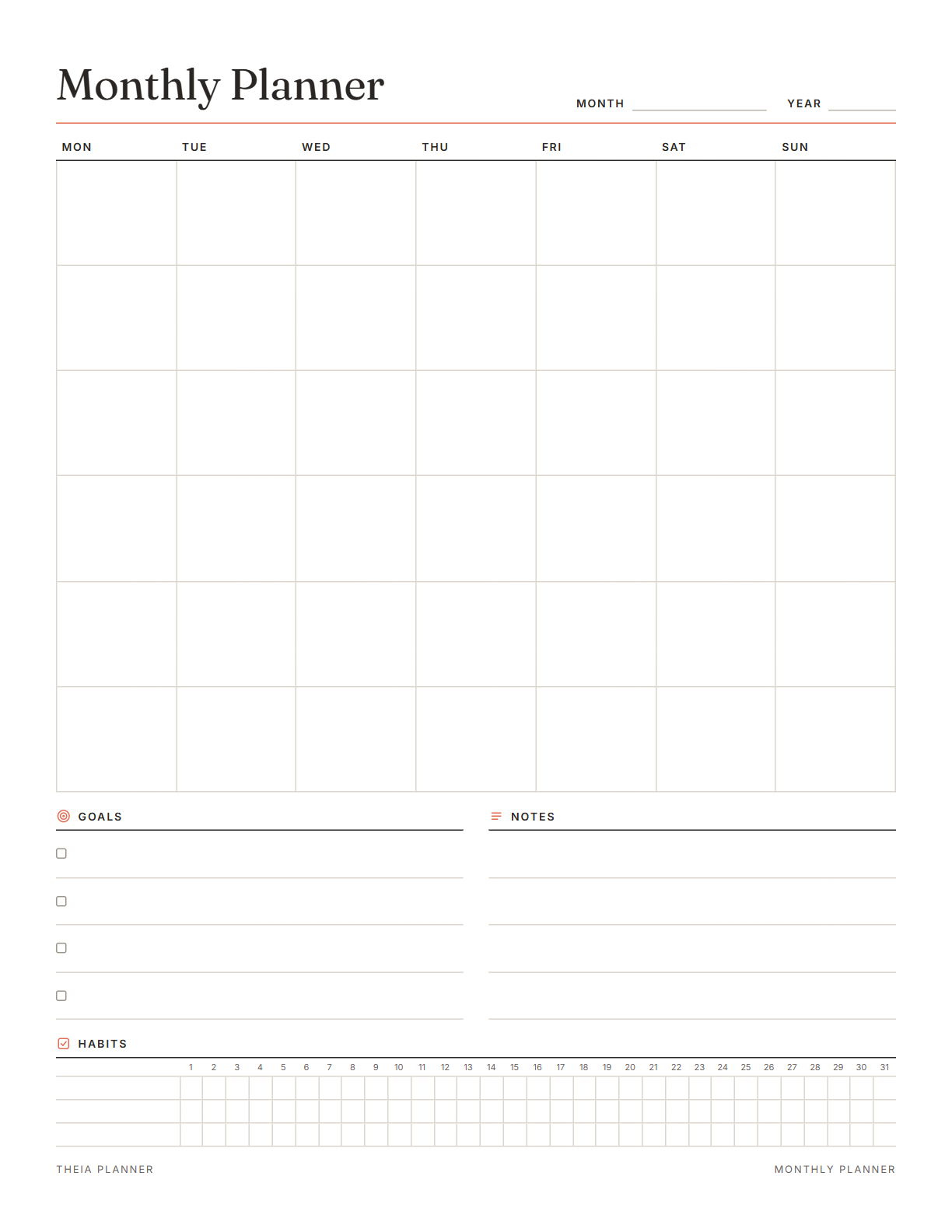
Free monthly planner 2027 you can edit and print
Pick your settings, type on the lines and tick the boxes, then print it or save it as a PDF. It is free, with no sign-up and no email.
What is on the monthly planner template
How to set up your printable monthly planner
- Choose the month and settingsPick a month of 2027 or 2028, or undated. Then set Letter or A4, a Monday or Sunday start and an accent color.
- Add dates, goals and habitsType appointments and deadlines into their days. Then fill in your goals, notes and the three habits you want to track.
- Print or save your monthYour typed text prints with the page, and Save as PDF in the print window gives you a file. To write by hand, download the blank PDF.
The free online version, in action
How to plan and review your month
A month on one page shows what is coming before it arrives. These steps help you set up the sheet on the first day and use it until the last. Pair it with a weekly or daily page when you want more detail.
Before a new month, look at last month's page. Note which goals you reached, which habits held and what you want to change. Ten minutes is usually enough.
Add birthdays, bill due dates, appointments and school breaks to their days. Busy weeks show up at once. Put travel and long weekends in early, since they shape the rest of the month.
Four goal lines is a useful limit. Pick goals you can finish in about four weeks, and split bigger ones into monthly steps. Write each goal so that on the last day you can tell whether it is done.
The habit strip has room for three habits. Choose ones you can do on most days, and tick each day you keep them. Missing one day is normal. Start again the next morning.
The month page holds dates and goals, while a weekly page holds the detail. Each Sunday, copy the coming week's items across and add tasks. Once an item has a day on the week page, tick it on the month page.
Print the next page a few days before the month starts, so upcoming dates have a place to go. Keeping the same layout each month makes months easy to compare.
Reminders in your Google Calendar
Connect Google Calendar once, and these items are added to a separate “Theia Planner” calendar. Items with a time get a reminder 30 minutes before.
How calendar sync works- Dated tasks, on their day of the month
- Monthly repeats, such as a review on the 1st
- Birthdays, every year on the date
- Timed tasks, each with a popup 30 minutes before
Who uses a monthly planner
Put school events, birthdays and appointments on one month page that everyone can read.
Mark exam dates and due dates for the term, one month at a time.
Note bill due dates and paydays, and keep money goals on the goal lines.
Set four goals each month, and track three daily habits that support them.
What the research says
Tracking progress helps
A review of 138 studies with nearly 20,000 people found that monitoring progress helped people reach goals. The effect was larger when progress was written down or shared.
Monthly planner printable, app or spreadsheet?
Each option works. The table below shows what each one does for you.
| Feature | Theia Planner | Free printable | Spreadsheet |
|---|---|---|---|
| Free to start | |||
| Set up for you in about a minute | |||
| Reminders on your phone | |||
| Dates and totals worked out for you | |||
| Works on phone and computer | |||
| Shared with family, with roles | |||
| A paper copy for the fridge |
Monthly planner questions
Is this monthly planner free?
Yes. The monthly planner costs nothing to edit, print or download. There is no account to create and no email to give.
Is there a monthly planner 2027 version?
Yes. Choose any month of 2027 and the dates fill the grid for that month. You can also pick any month of 2028.
Can I get an undated monthly planner?
Yes. Choose undated and the day squares stay blank. Write in the month and the day numbers yourself, so the page works for any year.
Can I type on the printable monthly planner?
Yes. Click into a day or a line and type before you print. Typing only works on this page, because the blank PDF is a print file and not a form.
Does the monthly planner have a habit tracker?
Yes. A strip of 31 days tracks three habits across the month. Click a day to tick it on screen, or tick it by hand on paper.
What paper size is the monthly planner template?
Two sizes are offered, US Letter and A4. Pick one before you print, and the blank PDF download is offered in both.
Can I print all 12 months at once?
No. The monthly planner prints one month at a time, so choose each month in turn. The 2027 calendar page can print a year page and 12 month pages together.
Is there an online monthly planner?
Yes. The free online planner has a Month view with your tasks and birthdays on each day. Click a day to see its full list and add to it.
More free planners and trackers

Plan your month free online
It is free to start, and the setup takes about a minute.
Start free