A free monthly budget planner with a 50/30/20 split
Type your income, bills and expenses into the budget planner, and it adds them up on screen. It also sets 50/30/20 targets from your income. Print the sheet, or plan the month online with bills and savings on one board.
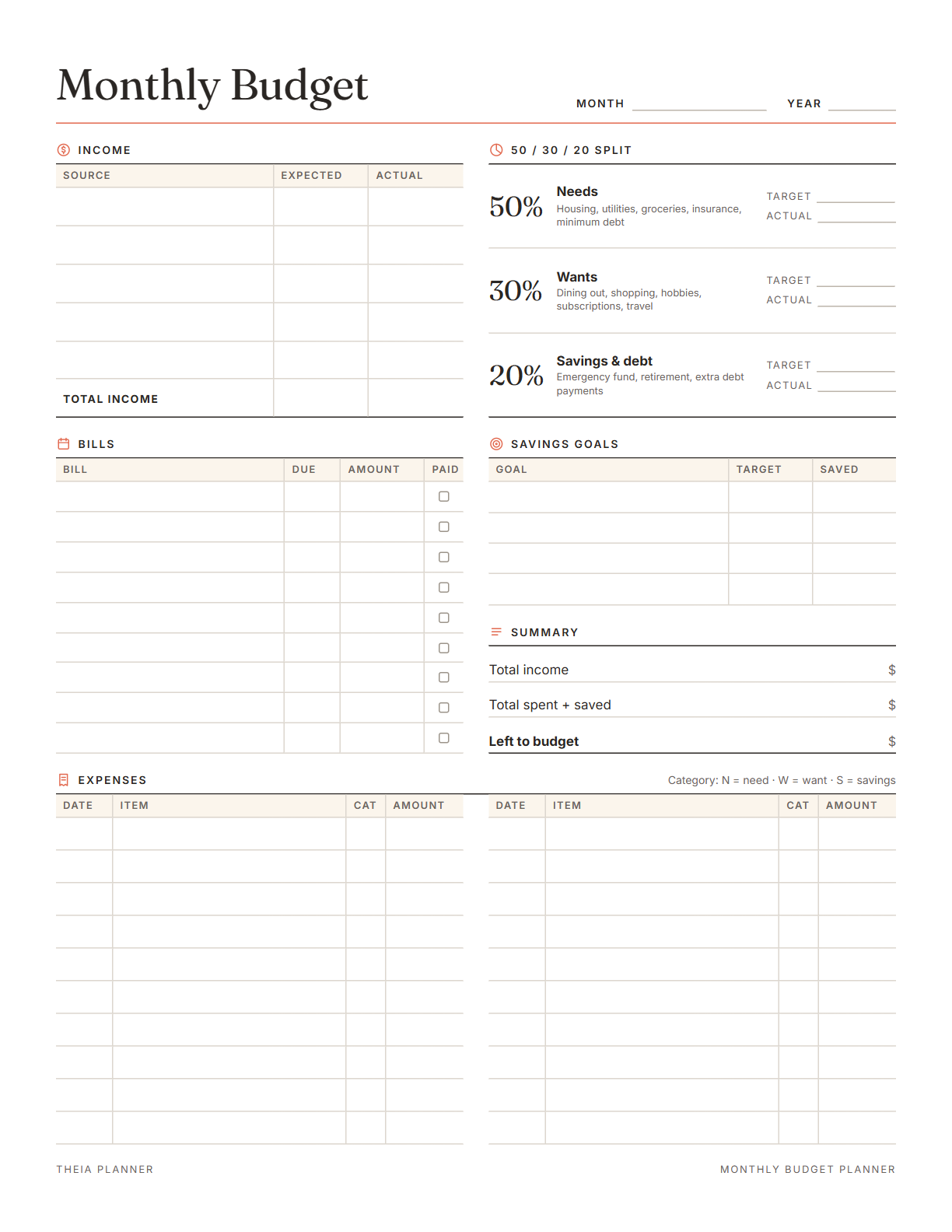
Budget planner printable that does the math
Pick your settings, type on the lines and tick the boxes, then print it or save it as a PDF. It is free, with no sign-up and no email.
What is in the budget planner
How to set up a monthly budget planner
- Enter your incomeType each source of take-home pay. The 50/30/20 targets fill in from the total.
- Add bills and expensesList your bills, then log spending and mark each line N, W or S for needs, wants or savings.
- Check the summarySee what is left to budget, then print the page or keep a PDF copy.
How to create a monthly budget
Learning how to budget money starts with a plan for one month, made before the month begins. These six steps follow the order of the sheet, from income to a review at the end.
Use the amount that reaches your account after taxes and deductions. If your income changes from month to month, plan with a lower month.
Rent, utilities, insurance and loan payments go in the bills section first. Tick each one paid as the money leaves your account.
Groceries, gas and eating out vary from month to month. Look at the last two or three months of statements and start from what you really spent.
This common guideline puts 50% of take-home pay toward needs and 30% toward wants. The last 20% goes to savings and debt payments. Treat it as a starting point rather than financial advice, and adjust it if housing takes more than half.
Put each purchase on an expense line and mark it N, W or S. The summary shows what is left to budget while the month is still running.
Compare what you planned with what you spent in each part of the split. Carry the real numbers into next month's plan.
Reminders in your Google Calendar
Connect Google Calendar once, and these items are added to a separate “Theia Planner” calendar. Items with a time get a reminder 30 minutes before.
How calendar sync works- Each bill and subscription on its due day
- Monthly bills repeat on their own
- Yearly bills in their due month each year
- Bills due on the 29th to 31st land on the last day of shorter months
Budgeting worksheets for every household
Rent, groceries and kids' costs in one monthly plan. The bills section keeps every due date in one column.
A simple first budget with a small savings goal beside it. The 50/30/20 targets give you numbers to start from.
Plan with a lower month and see each month's spending on its own. Expected and actual income sit side by side on the sheet.
Bills, spending and debts together while you pay balances down. Mark extra debt payments S, so they count in the savings and debt part.
What the research says
Specific plans are more likely to get done
A meta-analysis of 94 tests found that planning when and where to act had a medium-to-large effect on reaching goals.
Budget worksheet, app or spreadsheet?
Each option works. The table below shows what each one does for you.
| Feature | Theia Planner | Free printable | Spreadsheet |
|---|---|---|---|
| Free to start | |||
| Set up for you in about a minute | |||
| Reminders on your phone | |||
| Dates and totals worked out for you | |||
| Works on phone and computer | |||
| Shared with family, with roles | |||
| A paper copy for the fridge |
Budget planner questions
Is the budget planner free?
Yes. You can type on the budget sheet and print it without signing up. Starting an online budget board is free as well, and no card details are needed.
What is the 50/30/20 budget?
It is a common guideline for take-home pay: 50% for needs, 30% for wants and 20% for savings and debt. It is not advice, and many people adjust it to fit their costs.
How do I create a monthly budget?
Add up your take-home pay, then list your fixed bills and estimate the costs that change. Choose amounts for needs, wants and savings, write down spending as it happens and review the month at the end.
Does the budget planner printable do the math?
Yes. On screen it adds up your income, bills and expenses as you type. It shows your 50/30/20 targets, what you spent and saved, and what is left to budget.
Can I use it as an income and expense worksheet?
Yes. It has five income lines with expected and actual amounts and 20 expense lines. The math works in dollars only. Each expense line also takes a date, so the month reads in order.
Is there a weekly budget worksheet?
No. The sheet covers one month at a time. If you are paid every week, enter each paycheck on its own income line, and the monthly total still adds up.
Is there an Excel or Google Sheets budget template?
No. This monthly budget template lives on the web page, ready for paper or a PDF file. Numbers you type are kept in this browser only, until you clear them.
Is this a budget app?
Yes. The online planner opens in any web browser, on a phone or a computer. It tracks spending against the budget you set, while income planning stays on the printable. It does not connect to your bank.
More free planners and trackers

Start your free budget planner
It is free to start, and the setup takes about a minute.
Start free